Introduction to VPNs

|
by Craig Miller
In this session we'll cover Virtual Private Networks (VPNs) and the technologies used implement them.
There are several reasons why to use VPNs
- Security
- IPv6 Protocol accessibility in an IPv4 world
- Circumventing Geo-Fencing
- Corporate Network Access
With the advent of TLS everywhere (or mostly everywhere), I contend that using VPNs for security are not needed. After all TLS is already doing the heavy lifting of encrypting your traffic.
There are technologies to create VPNs
- Browser-based VPNs
- Wireguard VPNs
- SSH VPNs (using SOCKS Forwarding)
- Commercial VPN Products
What is an IP tunnel?
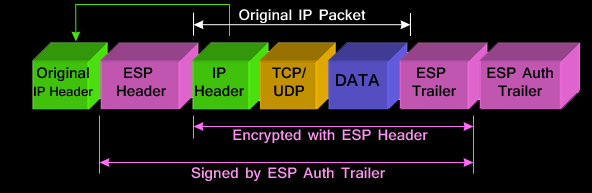
At its simplest, an IP Tunnel (either IPv4 or IPv6) is just an encapsulation.
A Simple IP-in-IP encapsulation using Encapsulating Security Payload (ESP) protocol. The entire original packet is encrypted and placed inside another IP packet. This can take place using IPv4 or IPv6.
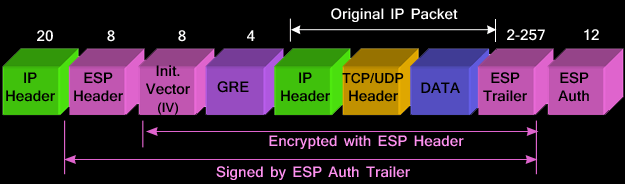
Another example using more encapsulation using Generic Routing Encapsulation (GRE)
And yet another example
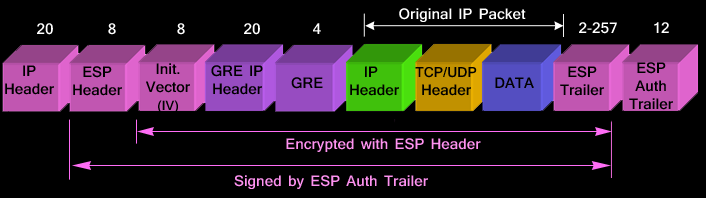
But as you can see, with each additional encapsulation, the overhead for each packet of data increases, while the available room to carry actual data decreases (packets are typically no longer than 1500 bytes)
Why use a VPN?
We'll cover why people may want to use a VPN.
Security
Many want to use a VPN for additional security. Security can be broken into two parts: encryption of traffic, and privacy. logging of your traffic.
I would contend that the encryption of a commercial VPN service, is not required. After all most traffic is already encrypted with TLS (Transport Layer Security, formerly known as SSL).
I would also contend that privacy may not be as good as you think, since the VPN service provider maintains logs (even when they say they don't) of your connections, and are subject to Government's lawful intercept.
Circumventing Geo-Fencing
By using a commercial VPN provider, one can get around Geo-Fencing. Content providers, such as streaming services, are contractually obligated to serve content within a given geography, usually a political boundary (e.g. a country). For those who which to see content not available in their geographical location, it is possible to use a VPN to appear to be from a different part of the world.
Technically, your encapsulated traffic is tunneled to a "different geographic location", and un-encapsulated (and NAT-ed), where it enters the internet. The source IP address, then appears to be in the "different geographic location". However streaming providers are onto this, and often black-list IP addresses from VPN services.
This can be one via IPv6 without NAT, a VPN service provider provides a IPv6 prefix from the "different geographic location" and therefore the streaming service sees an IPv6 prefix from "different geographic location". Of course these VPN service providers IPv6 prefixes can also be black-listed. For those who use Hurricane Electric tunneling for IPv6, have probably already encountered this problem.
Providing IPv6, even in an IPv4-only world
A VPN can be used to extend one's home network where IPv6 is available, to a remote location which only has IPv4 service, such as Hotels, coffee shops, and Quality Foods. Why is this useful? I turn off IPv4 access to my servers, which means the servers can only be managed via IPv6. Therefore I need an IPv6 connect to manage/update my servers. I do this because most of the bad-guys on the internet are only on IPv4. This is changing, as the bad-guys start using VPS's (Virtual Private Servers) with IPv6 enabled. But for now it filters out about 98% of the script-kiddies.
Technologies of VPNs
Depending on the use-case, there are different technologies that can be used to established VPNs. Additionally there are Personal VPNs, and Corporate VPNs. Corporate VPNs are typically used to work-from-home, and are mandated by the Corporation.
Browser-Based VPNs
Many of the alternative browsers include VPN support. These include: Opera, Vivaldi, Brave, and Edge. This VPNs are proxy-based, where the browser communicates with a proxy at the VPN end-point, or VPN service. The operation is similar to SSH VPNs (however the tunnel is different).
Here is an incomplete list of Browser-based VPNs:
| Browser | Type | Cost | Data Limit | Key Features |
|---|---|---|---|---|
| Opera | Built-in | Free | Unlimited | 3 regions, ad blocker, split-tunneling |
| Epic | Built-in | Free | Unlimited | 8 locations, auto-private mode, no logs |
| Brave | Built-in | Paid ($9.99/mo) | Unlimited | WireGuard, full-device, audited no-logs |
| Edge | Built-in | Free | 5 GB/mo | Cloudflare, WireGuard, 3 modes |
| Aloha | Built-in | Free | Unlimited | Auto-connect, mobile-focused, ad blocker |
| Avast | Built-in | Paid | Unlimited | 30+ servers, OpenVPN, full-device |
The downside of Browser-based VPNs, is that it only handles web traffic.
Wireguard VPNs
Wireguard's first release was in 2015, and in 2020 was integrated into the Linux Kernel. It is therefore available to every Linux machine running a kernel later than 5.6 (the current kernel is 7.0r-c7). Wireguard has also been ported to BSD systems, including FreeBSD, NetBSD, OpenBSD, iOS, MacOS, and Windows.
It is relatively easy to setup, used public-private key cryptography, and is open-source. Additionally, it can be used not only as client-server (technically they are not client-server but peer-to-peer), but also can be configured to be site-to-site. The latter is how I have extended my home IPv6 network to our NetSIG meetings.
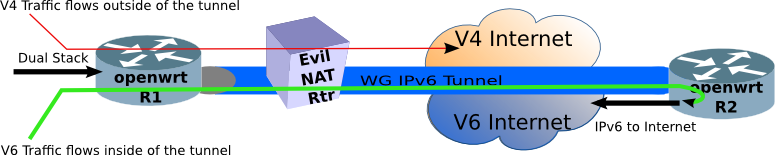
As part of the OpenWrt peer configuration, a route (or you can think of it as a filter) is configured, called allowed IPs, allowing traffic to enter the tunnel.
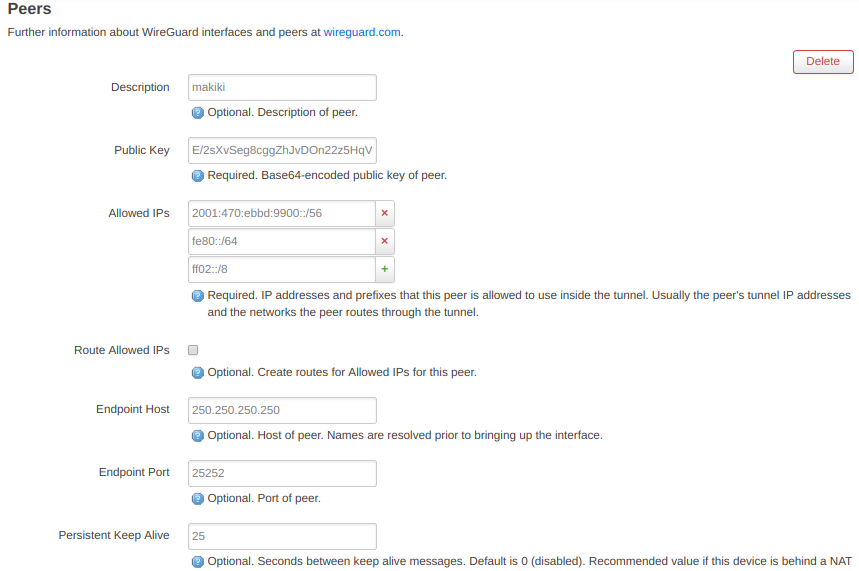
Wireguard uses routing to determine which packets are placed into the tunnel. Because of which, it is not possible to for Wireguard to bridge (Layer 2) two networks together. In IPv6, this means there must be enough address space to route packets across the Wireguard VPN.
The downside of Wireguard VPNs is scalability. The public/private keys must be distributed "out-of-band", which is fine for a handful of peers, but become challenging when there are thousands of peers.
SSH VPNs using SOCKS Proxy
ssh is a very useful secure communications utility. Not only does it feature a secure connection to a remote shell on a machine, but it can forward other traffic through the SSH tunnel, including X11 displays, file sharing data, and even web traffic.
The following command will create a SSH tunnel for the SOCKS (SOCKet Secure) protocol using the -D option.
ssh -l cvmiller -D 8080 user@vpn.example.com
By configuring your browser to localhost:8080 as a SOCKS proxy (below), the web requests will appear to exit from the host vpn.example.com.
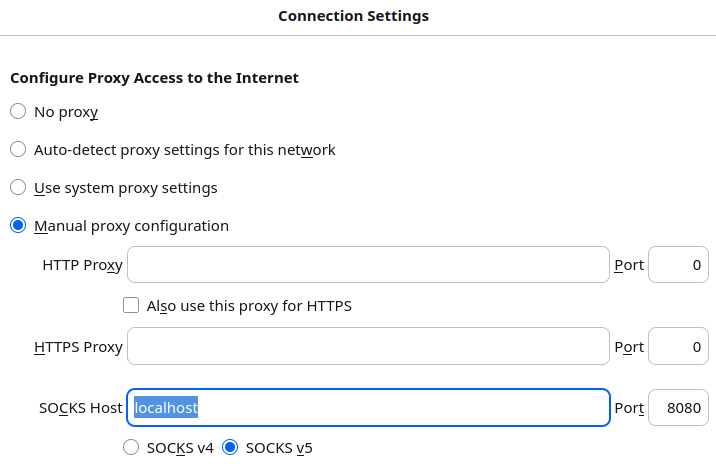
Of course ssh has options for carrying other traffic through the VPN tunnel using the -L. For example, to forward the email POP (Post Office Protocol), SMTP (Simple Mail Transport Protocol), and IMAP (Internet Message Access Protocol) and use a SOCKS proxy, one would use the following command:
ssh -l user -D 8080 -L 110:pop.example.com:110 -L 25:smtp.example.comt:25 -L 143:imap.example.com:143 remote.example.com
The mail client will have to be configured to send traffic to the localhost, rather than the remote mail server.
Commercial VPNs
anyu Commercial VPN providers have a browser plug-in to simplify the configuration of the VPN client. NordVPN, Surfshark, or Proton VPN all require plug-ins which gives the VPN provider more control, but are more opaque in what data is transiting the VPN.
At the end of the day, do you want to trust your privacy to a VPN provider you only pay $5/month to? If you value your privacy, you may want to choose a reputable VPN provider, and that may cost a bit more.
1. Hands On - Running a VPN
Using a browser-based VPN. In this example, the Browser is Vivaldi which has a built-in Proton VPN client. After logging into Proton, activate the VPN, and sniff the outbound packets from the laptop.
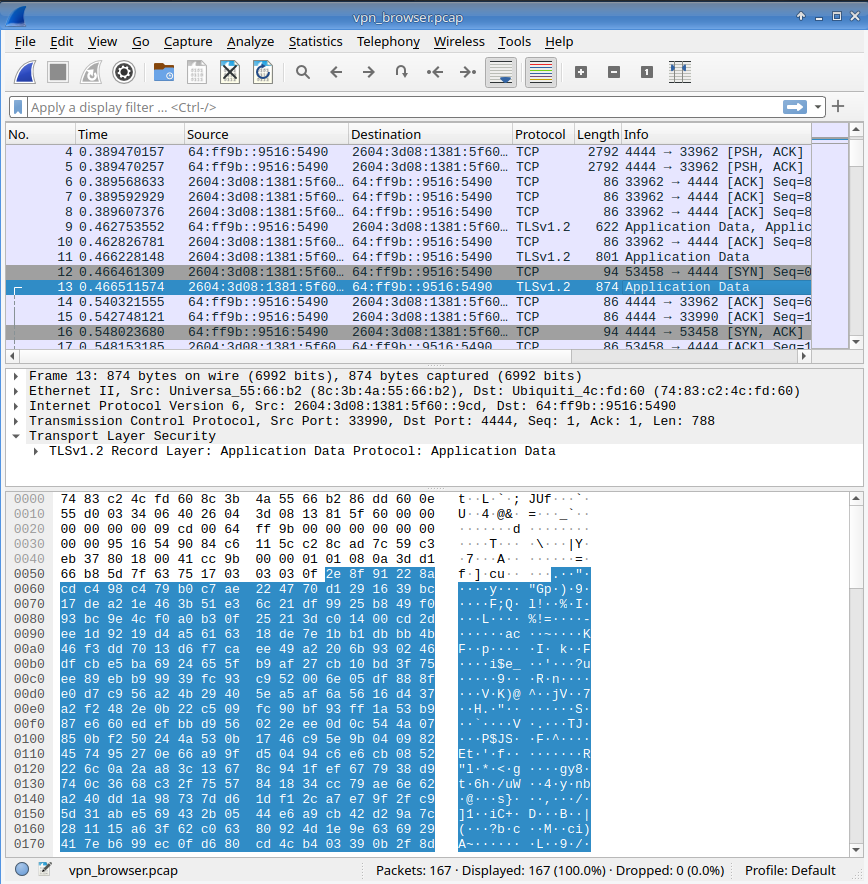
Looking at the packet capture (above), Attempt/Answer the following:
- What OSI layers can be seen on the capture?
- What is the destination address of the Browser VPN (the VPN server address)?
- What kind of address is the answer to #2
- Is this VPN service support IPv6?
- Extra Credit: What is the VPN Server's IPv4 Address
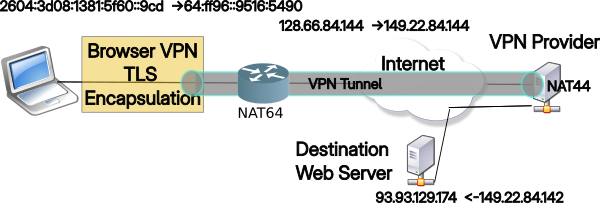
Unpacking the Browser-based VPN exercise
The VPN network diagram is:
Other Issues with VPNs
Leakage
Checking online, and you will see a lot of talk about VPN leakage. VPN Leakage is where not all of the traffic goes though the tunnel. A common form of leakage is DNS Queries. While the web requests/responses may go through the VPN tunnel, the DNS Queries may not. This is a form of leakage, in that although the requests/responses are encrypted, the DNS Queries go directly to your DNS server (usually the home router), which relays the requests out to the ISP (by default). The ISP may not know what data you are looking at, but they will know what sites you have visited.
Another form of VPN leakage is IPv6. Most VPN providers don't support IPv6 (because they don't understand it). So when going to a dual-stack website, Happy Eyeballs (built into the browser, see RFC 8305), will start a race between IPv4 and IPv6. If your VPN is active, but only supports IPv4, then the browser may select IPv6 (because it happened to win the race), and that traffic will NOT go through the VPN.
The VPN Provider's solution is to disable IPv6. Why, because they don't want to support IPv6. A better solution is to use a VPN provider that does support IPv6. Some VPN providers which do support IPv6 are: AirVPN, Mullvad, and AzireVPN
Mullvad has a nice Leak check program.
VPN Kill Switch
According to a LLM: "A VPN kill switch is a security feature that automatically blocks all internet traffic on your device if your VPN connection unexpectedly drops, preventing your real IP address and data from leaking onto the open internet."
Sounds like a good privacy feature, but it also sounds like a way to confuse the user, when suddenly the Internet is no longer accessible and they don't know why. I have seen this happen with friends when they can't get to the internet, they have to disable their VPN, in order to get back on the internet. Perhaps not the great security feature VPN Providers would have you believe.
Conclusions
VPNs can be very useful, such as accessing the IPv6 Internet when all you have is an IPv4 connection at your hotel, or Jumping Geo-fencing, because the Netflix.com selection is w-a-y better than Netflix.ca. But VPNs are also not without their problems, difficulty to setup, DNS leakage, lack of IPv6 support by many Providers, and the silent kill switch which cuts all internet access.
Before running a VPN, think about why you need a VPN, and that will guide much of your decision making. If you want a truly private VPN, run your own. Both SSH and Wireguard VPNs are relatively easy to setup, and not only will you have true privacy, but you'll learn something along the way.
Notes:
- Tunnel graphic by AI, deepai.org
- Encapsulation graphis from Firewall.cx
- VPN discussion topics - https://www.venn.com/learn/vpn-tunneling/
14 April 2026